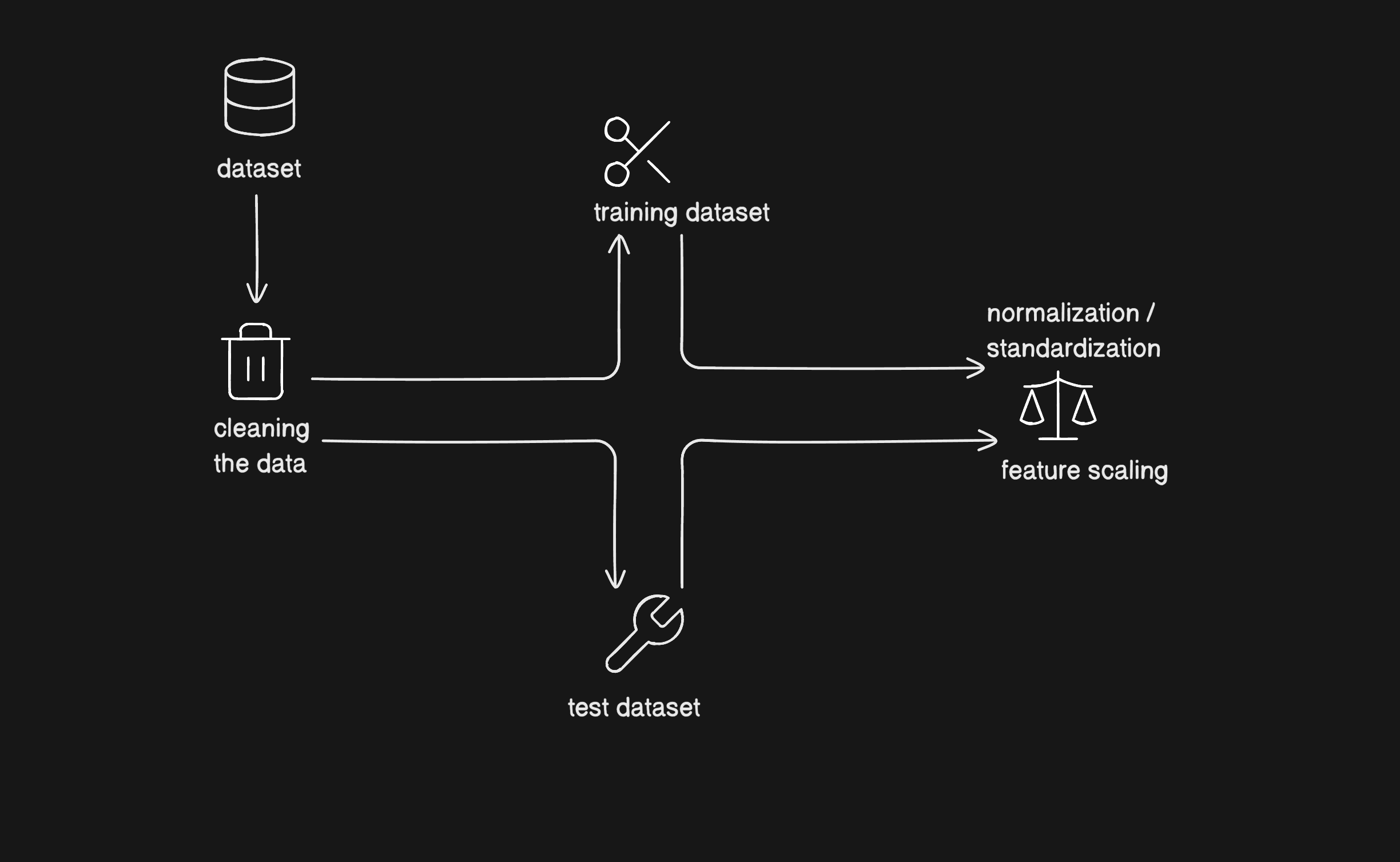
Abstract
This review presents an in-depth discussion of data pre-processing and augmentation methods for machine learning, inspired by recent academic proceedings. We address common problems found in real-world data, systematic steps for pre-processing, and a taxonomy of augmentation strategies. Issues such as noise, missing, and inconsistent data are explored alongside standard solutions — both mathematically and with practical code snippets — so readers can visualize and implement best practices directly.
1. Introduction
Machine learning techniques are rapidly redefining solutions across industries. However, the flexibility and performance of ML models critically depend on the underlying data's quality, volume, and diversity. As observed by Maharana et al. (2022), raw data—collected as tables, images, signals, or text—often harbors noise, incompleteness, and inconsistency. These problems, if ignored, reduce the accuracy and generalizability of models.
Effective pre-processing is crucial. It includes cleaning, transformation, integration, and reduction, transforming raw observations into structured, analyzable data :
where transformation maximizes information retention, reduces flaws, and enhances feature representation for model training.
The following figure reflects the main issues plaguing real-world data:
| Issue | Description | Impact |
|---|---|---|
| Too much data | Data deluge from sources like sensors or communications; leads to computational inefficiency | Obscures relevant features, increases complexity |
| Too little data | Insufficiency or large portions missing; e.g. in healthcare | Hinders pattern learning, bias, unreliable predictions |
| Fractured data | Combined datasets with inconsistent formats/semantics | Errors in downstream analysis, hard to integrate |
2. Problems with Raw Data
Data is typically never clean at source. Table 1 illustrates the categorization of common data problems:
| Problem | Example Context | Effects | Typical Remedy |
|---|---|---|---|
| Too much data | Telecom, Healthcare | Delays, resource exhaustion | Dimension reduction, sampling |
| Too little data | Missing values/features | Loss of information, bias | Imputation, discard, augment |
| Fractured data | Multiple platforms | Format inconsistencies, schema mismatch | Data standardization, integration |
Figure 1: Problems with data collected from real-world sources (inspired by Maharana et al., 2022).
3. Features in Machine Learning
A dataset represents samples (rows/instances/objects) described by features (columns/attributes). Features, as crucial indicators of data characteristics, are mainly classified as:
- Categorical: Discrete values; e.g., countries (
'USA', 'India'), boolean flags. - Numerical: Quantitative; e.g., temperature, age, sales amount.
Below is a simple table depicting feature types:
| Feature Example | Type | Nature |
|---|---|---|
Gender (M/F) | Categorical | Discrete, nominal |
| Height (cm) | Numerical | Continuous |
| Purchases (count) | Numerical | Discrete |
| State | Categorical | Nominal |
A clear understanding helps decide encoding and imputation methods in pre-processing.
4. Data Pre-processing: Steps, Visual Examples & Code
Pre-processing is the transformation of (raw) to (cleaned and structured), ensuring:
- Preservation: Keep relevant information.
- Rectification: Removal of errors, inconsistencies, redundancies.
- Enrichment: Making data more valuable and suitable for modeling.
4.1 Data Cleaning
Typical Steps
| Step | Description |
|---|---|
| Remove duplicates | From merged/scraped/aggregated datasets |
| Fix structure errors | Mislabeling, capitalization, typos |
| Handle missing values | Fill with mean/median/mode, or drop if >20% missing |
| Validate data types | Ensure consistency (e.g. ints as ints) |
Python Example: Imputation
from sklearn.impute import SimpleImputer

num_imputer = SimpleImputer(strategy="median")
cat_imputer = SimpleImputer(strategy="most_frequent")

df[num_cols] = num_imputer.fit_transform(df[num_cols])
df[cat_cols] = cat_imputer.fit_transform(df[cat_cols])
4.2 Handling Noise
Noise may originate from sensor errors, entry mistakes, or outliers.
- Binning: Smooths data by grouping values into bins (equal-width or equal-frequency).
- Regression: Fits trends to data, identifies and excludes noisy/outlier values.
- Clustering: Groups similar data points, isolating noise.
Table: Examples of Noise Handling
| Method | Scenario | Outcome |
|---|---|---|
| Binning | Sensor readings | Smooths fluctuations |
| Regression | Continuous values | Predicts/fills gaps |
| Clustering | Unlabeled data, outliers | Groups, identifies noise |
4.3 Data Integration
Combining multiple data sources (heterogeneous schemas) into one coherent dataset is vital for seamless analysis.
| Problem | Example | Solution |
|---|---|---|
| Schema mismatch | Different column orders/context | Global mapping |
| Inconsistent units | USD vs INR, meters vs feet | Unification |
| Redundant entries | Overlapping data from sources | Deduplication |
4.4 Data Transformation
Standardizes data for better model fit.
- Normalization: Rescales values (e.g., 0-1).
Example:Textfrom sklearn.preprocessing import MinMaxScaler scaler = MinMaxScaler() X_train_scaled = scaler.fit_transform(X_train) X_test_scaled = scaler.transform(X_test) - Standardization: Sets zero mean, unit variance.
- Aggregation: Summarizes values, e.g., monthly totals.
- Smoothing: Removes random fluctuations.
- Dimensionality Reduction: PCA, attribute selection.
Taxonomy Table
| Step | Brief Example |
|---|---|
| Normalization | Convert [100, 200] to [0.0,1.0] |
| Aggregation | Group sales by month |
| Dimensionality Red. | PCA for ~>10 features |
4.5 Train-Test Split
To prevent overfitting and ensure generalization, datasets are split (typically 80/20 or 70/30).
from sklearn.model_selection import train_test_split

X_train, X_test, y_train, y_test = train_test_split(
    X, y, test_size=0.2, random_state=42, stratify=y
)
Stratify ensures class balance for classification.
4.6 Encoding Categorical Data
| Encoder | Use Case | Code Example |
|---|---|---|
| Label Encoding | Ordered/ordinal | LabelEncoder() |
| One-Hot | Nominal categories | OneHotEncoder() (see below) |
from sklearn.preprocessing import OneHotEncoder
from sklearn.compose import ColumnTransformer

ct = ColumnTransformer([
    ("encode", OneHotEncoder(), ['Gender', 'City'])
], remainder='passthrough')
X = ct.fit_transform(X)
4.7 Pipelines for Reliable Processing
Automate reproducible pre-processing:
from sklearn.pipeline import Pipeline
from sklearn.compose import ColumnTransformer
from sklearn.impute import SimpleImputer
from sklearn.preprocessing import StandardScaler, OneHotEncoder

num_cols = ['Age', 'Salary']
cat_cols = ['Country', 'Gender']

num_pipeline = Pipeline([
    ('imputer', SimpleImputer(strategy='median')),
    ('scaler', StandardScaler())
])
cat_pipeline = Pipeline([
    ('imputer', SimpleImputer(strategy='most_frequent')),
    ('encoder', OneHotEncoder(handle_unknown='ignore'))
])
preprocessor = ColumnTransformer([
    ('num', num_pipeline, num_cols),
    ('cat', cat_pipeline, cat_cols)
])

X_train_prep = preprocessor.fit_transform(X_train)
X_test_prep = preprocessor.transform(X_test)
5. Data Augmentation: Concepts, Types, and Visuals
When training data is limited, augmenting it with realistic variations elevates model capacity and reduces overfitting. The taxonomy of augmentation covers:
5.1 Symbolic and Rule-based Augmentation (Text, Tabular)
- Rule-based: Swapping/deleting/inserting/synonym replacements in text (Easy Data Augmentation).
- Symbolic: Utilizing templates, entity replacement.
5.2 Graph-Structured Augmentation
- Text graphs: Citation networks, syntax trees, knowledge graphs to add structure and relationships.
5.3 Mixup & Feature Space Augmentation
- Mixup: Blends samples and their labels (½ from A, ½ from B, blending outputs).
- Feature-space augmentation: Adds noise or interpolates features in hidden layers (neural image/text representations).
5.4 Neural Augmentation
- GANs: Synthesize images/text (e.g., for rare cases in medical imaging).
- Style transfer: Transfer appearance or writing style from one instance to another.
- Adversarial training: Train models to be robust against intentionally perturbed ("fooled") samples.
Image-based Augmentation Table
| Technique | How It Works | Benefits |
|---|---|---|
| Geometric Transforms | Flipping, rotation, cropping, translation | Adds position invariance |
| Color transforms | Adjust colors, brightness, contrast | Handles lighting variation |
| Noise Injection | Add "salt & pepper," blur | Robustness to real-world noise |
| Random Erasing | Occlude regions to simulate missing objects | Model learns occlusion |
| Image Mixing | Overlay/combine images | Expands class boundary, diversity |
# Example: Image augmentation with Keras (for visualization)
from tensorflow.keras.preprocessing.image import ImageDataGenerator

datagen = ImageDataGenerator(
    rotation_range=15,
    width_shift_range=0.05,
    height_shift_range=0.05,
    shear_range=0.05,
    zoom_range=0.05,
    horizontal_flip=True,
    fill_mode='nearest'
)
5.5 Other Overfitting Solutions
- Transfer Learning: Leverage pre-trained models for feature extraction
- Dropout Regularization: Drop random units during training (
Dropoutlayers in neural nets) - Batch Normalization: Standardizes layer activations for stable training
- Pre-training: Learn weights/features on a large dataset before fine-tuning
6. Discussion
Extensive experimentation confirms: Data pre-processing forms up to 50–80% of ML workflow time (see Table below), and its quality is proportionally reflected in model accuracy and stability.
| Workflow Step | Estimated Time Share |
|---|---|
| Data Cleaning | 30–50% |
| Data Transformation | 10–20% |
| Feature Engineering | 10–20% |
| Model Training/Tuning | 10–30% |
Augmentation, through regularization and realistic variation, pushes performance boundaries and robustness, especially in vision and NLP settings.
7. Conclusion
This article summarized challenges and remedies in real-world ML data pipelines, mirroring academic and engineering best practices. Key pre-processing stages, issues with raw data, feature types, and step-wise workflows were elaborated using tables, visualizations, and code — enabling practical comprehension. Data augmentation, from rule-based to GAN-driven, is essential where datasets are small or unbalanced. As the ML field advances, systematic pre-processing and creative augmentation remain foundations for model excellence.
Further Code
Here is the github repo and the code containing all the reference, if possible please give it a star: